While IRT KilnMonitor version 3.x is generally backward compatible with version 2.x, users should be aware of some notable changes:
1.Program Location:
Version 2.x: The recommended installation directory was C:\KilnMonitor.
Version 3.x: The software now installs to Program Files (x86), consistent with many other applications.
2.Kilns Configuration Location:
Version 2.x: Supported a single configuration set located in the LSC-Settings subfolder of the IRT KilnMonitor installation directory.
Version 3.x: Supports multiple configurations, with one being active at any given time. These configurations are stored in C:\ProgramData\GRAYESS\GRAYESS IRT KilnMonitor\Configurations.
3.History Folder Location:
Version 2.x: Allowed users to define an individual history folder for each kiln.
Version 3.x: Consolidates the history of all kilns into a single folder. However, the overall structure of the history folder remains unchanged.
IRT KilnMonitor Server: installing version 3.x on computer where version 2.x was installed
1.Backup LSC-Settings Folder: Before initiating the 3.x installation, create a backup of the LSC-Settings folder. It is usually located at C:\KilnMonitor\LSC-Settings.
2.Backup Kiln History Folder: Save a copy of the kiln history folder, preferably to an external drive for safety.
3.Installation: Launch the IRT KilnMonitor 3.x installer. It will automatically detect, uninstall the older 2.x version, and proceed with the 3.x installation.
4.Close the Application: After the installation completes, close the IRT KilnMonitor application.
5.Transfer Configuration: Copy the contents of the LSC-Settings folder to C:\ProgramData\GRAYESS\GRAYESS IRT KilnMonitor\Configurations\Default.
6.Verify Configuration: Open IRT KilnMonitor. In the Start-up screen, navigate to menu System | Configure Kilns to confirm the new configuration. If the configuration appears empty, ensure you followed step 5 correctly. Remember, restarting IRT KilnMonitor may be necessary. Also, ensure that "Default" (the folder you transferred configurations to) is set as the active configuration under menu System | Configurations.
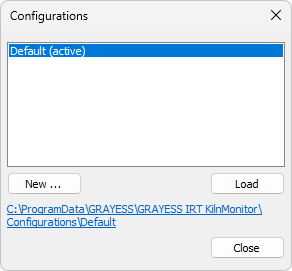
7.History Folder Configuration: In the configuration view (menu System | Configure Kilns), click on Common Settings. This opens the Common Kiln Settings dialog where you can specify the history folder's location. If in version 2.x all kilns used the same old history folder, you can repoint to it. Otherwise, consolidate all kiln data into a singular directory. Ensure the history folder's structure resembles:
KilnHistory
|-- Kiln1
| |-- Config
| |-- State
|-- Kiln2
...