You can enhance the functionality of IRT Analyzer by integrating Python scripts in various ways:
1.Script Triggered as an Action: Run a Python script in response to specific events.
2.Conditions Logic: Implement automation conditions controlled by Python scripts for more complex automation.
Configuring Python Scripts
Python scripts can be configured in the Automation Mode setup dialog, specifically on the Python Script page. Here, you define scripts that run when automation mode starts and stops. Due to limited space for script text on this page, it is recommended to use this area solely for loading the necessary Python modules and calling initialization or deinitialization routines.
·Startup Script: Executed when automation mode starts.
·Exit Script: Executed just before automation mode stops.
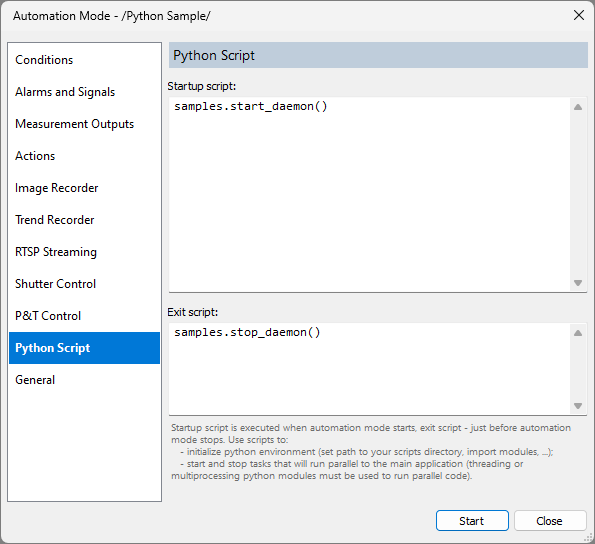
Your Python modules should be stored in the 'PyProcessControl' subfolder of the directory where IRT Analyzer is installed (typically within Program Files). To import your module in the Startup script, use the statement 'import <your_module_name>'. It is advisable to keep most of your Python code within these modules, limiting the Automation Mode setup to just module calls.
Console Output
Console output from Python scripts, such as from 'print' statements, is directed to the Messages Window. To view this, select 'View | Messages Window' from the main menu or press F4.
Python Script Samples
IRT Analyzer includes a 'samples.py' module with simple code examples illustrating how Python actions and events work within IRT Analyzer. This module can be found at 'PyProcessControl\embedscripts\samples.py'. The samples module is imported automatically, so manual importing is unnecessary.
Examples provided in the 'samples' module include:
·print_image_data: A function callable as an action, which prints current image measurements to the Messages Window.
·send_to_influxdb: Demonstrates storing measurements in an InfluxDB database.
·start_daemon, stop_daemon, daemon_thread: Showcases running Python code in parallel and setting up Python automation conditions.
Python Actions
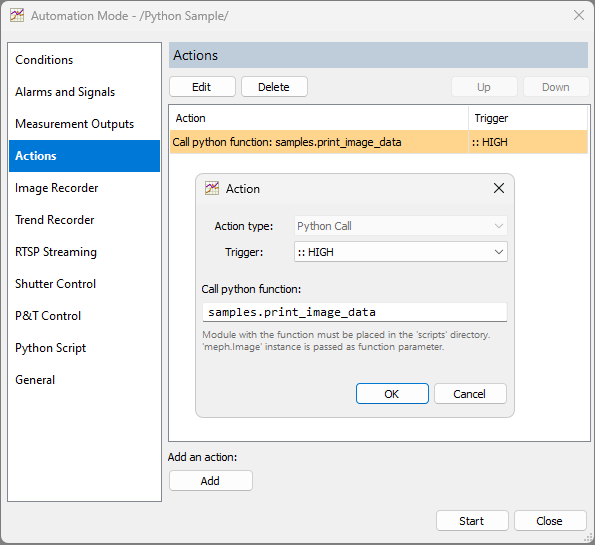
Actions in IRT Analyzer are triggered when a specific condition is met. To create a Python Script action, open the Automation Mode setup dialog, select the Python Script tab, and press the 'Add' button. Choose either 'Python Call' or 'Python Script' as the Action type.
·Python Call: Calls an existing Python function by name. The function must be defined in the Startup script or in a module imported therein.
·Python Script: Allows entering a script that executes when a trigger is activated.
When a Python Call function is triggered, it receives one parameter of type 'meph.Image'. When a Python Script is triggered, a 'meph.Image' object is passed as a local variable named 'img'.
Python Conditions
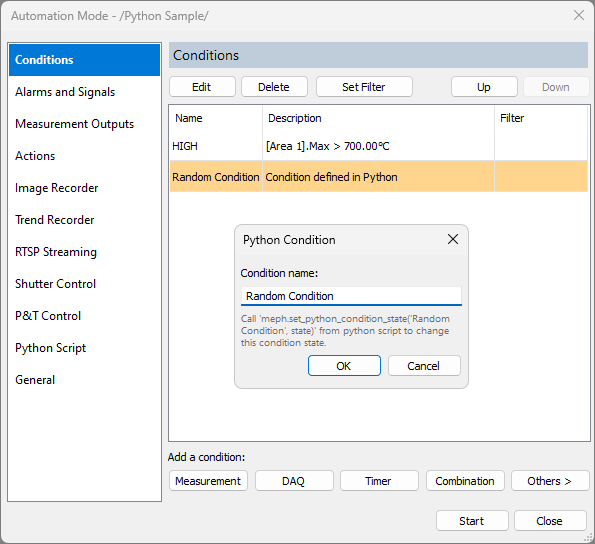
To add a new condition controlled by a Python script, go to the Conditions page and click the Python button under 'Add a condition'. After naming the condition, you can control its state within your Python code using the 'set_python_condition_state(condition_name, state)' function.
Running Python Code in Parallel
For automation conditions dependent on external processes or devices accessible from your Python script, you may need to run Python code in a separate thread or process. This is typically started in the Startup script. In this separate thread, you can subscribe to events from your process/device and update the IRT Analyzer Python automation condition using 'set_python_condition_state()'.
Refer to the 'daemon_start', 'daemon_stop', and 'daemon_thread' functions in the 'samples.py' module for an example of this approach.
Classes and Functions
Classes and functions for accessing IRT Analyzer objects, such as images and measurements, are defined in the 'meph' module. This module is imported automatically, providing access to its classes and functions in all scripts.
The 'meph' module includes the following classes:
·Image
·Spot
·Line
·Area
·Metadata
·AutomationState
Additionally, the 'meph' module provides functions such as 'set_python_condition_state' for automation control, and logging functions like: 'system_log_info', 'system_log_warning', 'system_log_error', and 'system_log_set_error_state'.
For details please check the source code in 'PyProcessControl\embedscripts\meph.py'.