Use Organizer mode to manage files and folders, link infrared and visual images, manage notations and comments, change palettes and temperature ranges, and edit infrared-image properties.
Tip: Select Organizer on the toolbar to switch to Organizer mode.
|

The following figure identifies the main Organizer-mode elements.
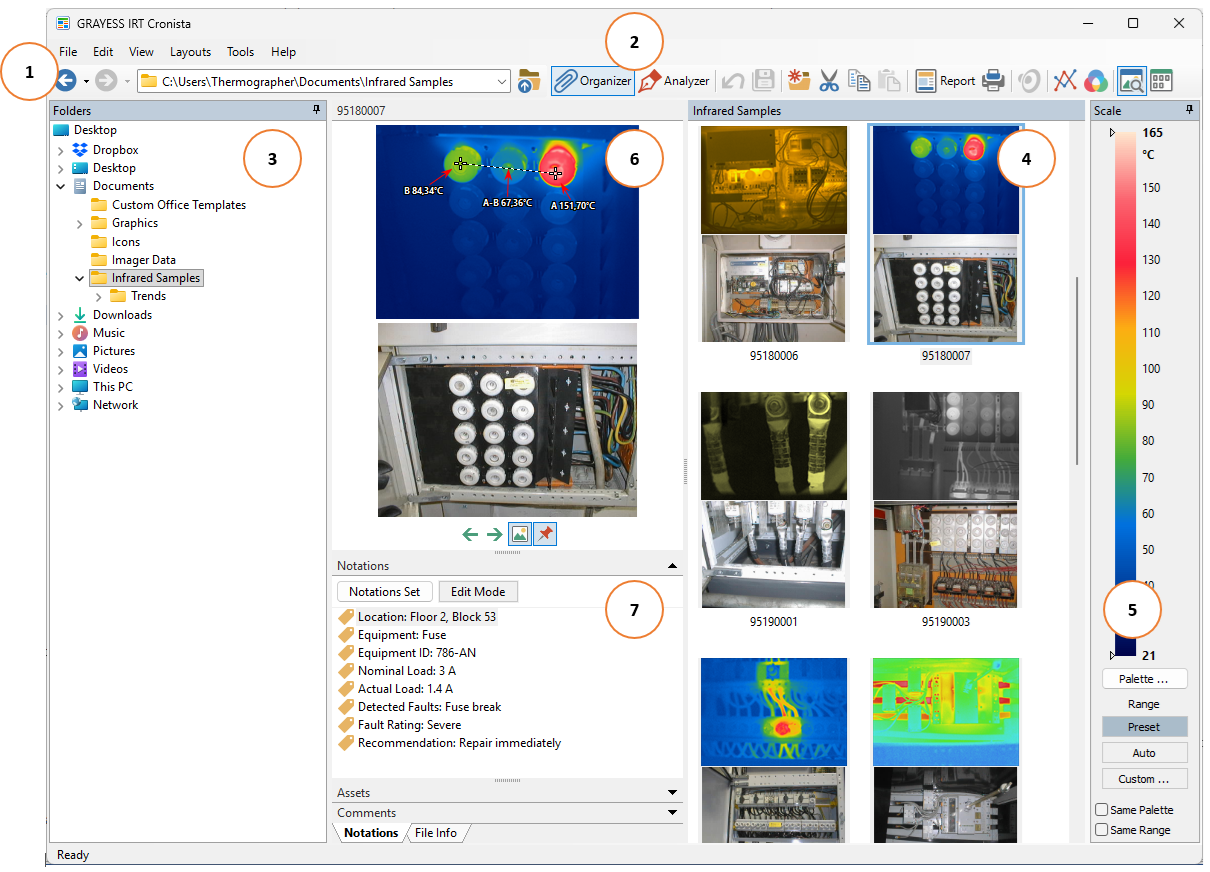
1.Main menu, toolbar and address bar.
2.Buttons to switch between Organizer and Analyzer modes.
3.Folders window.
4.Folder Contents window (displays the contents of the folder selected in the folders tree).
5.Temperature scale and palette.
6.Preview window (displays the focused item).
7.Notations for the focused item.
Open images, files, and folders
Select a folder in the Folders window. Its contents appear in the Folder Contents window, and its path appears in the address bar.
Use the address bar to navigate to a folder or drive. For example, select the C drive to show its folders in the folder tree and its contents in the Folder Contents window.
Use the Back, Forward, and Up toolbar commands to navigate between folders.

Back returns to the preceding location, Forward returns to a later location after you use Back, and Up opens the parent folder.
To work with an image, open its folder and click it in the Folder Contents window. The image becomes focused and appears in Preview. Notations displays its notations and comments.
For practice, use the Infrared Samples installed in the Documents folder.
Focused and selected images
The focused image is the image displayed in the Preview window. Several images can be selected at once, but only one image is focused.
There is no visible difference between a focused image and the other selected images in Folder Contents. To identify the focused image, look at Preview. If the window is hidden, show it using View > Preview.
When Same Range or Same Palette is cleared, changes to the corresponding settings in the main Temperature Scale window affect only the focused infrared image, even if several images are selected.
For more information, see the following chapters:
§Working with files and folders
§Linking visual images to infrared images