IRT Cronista can display infrared images at zoom levels from 10% to 1000%. Zoom in to inspect image details or position measurement objects precisely, and zoom out to see more of the image.
Zoom in or out
Click the zoom-in button  or zoom-out button
  on the analysis toolbar. You can also select View > Zoom > Increase or View > Zoom > Decrease. The same commands are available from the image context menu.
In single-image analysis, you can also point to the image and rotate the mouse wheel. Rotate it forward to zoom in or backward to zoom out. The position under the pointer remains in place as the zoom changes. In multi-image analysis, the mouse wheel scrolls through the images instead.
Select or enter a zoom level
The zoom box on the analysis toolbar displays the current zoom. Select one of the predefined values, or enter a custom value:
1.Click the zoom box.
2.Enter a value from 10% to 1000%.
3.Press Enter.

Auto zoom
Auto automatically calculates the zoom from the available analysis area. In single-image analysis, it fits the image into the window. In multi-image analysis, it also determines the image arrangement.
Select Auto in the zoom box, or select View > Zoom > Auto. The zoom box displays (A) after the percentage when Auto zoom is active.

Standard zoom
Standard uses the zoom calculated by IRT Cronista from the image dimensions and display scaling. This is also the zoom used when images are exported to reports.
Select Standard in the zoom box, or select View > Zoom > Standard. The zoom box displays (S) after the percentage when Standard zoom is active.

Navigate a magnified image
When the entire image does not fit in the analysis area, the Zoom window appears automatically. Its outlined rectangle identifies the part of the image currently visible. Drag the rectangle to display another part of the image.
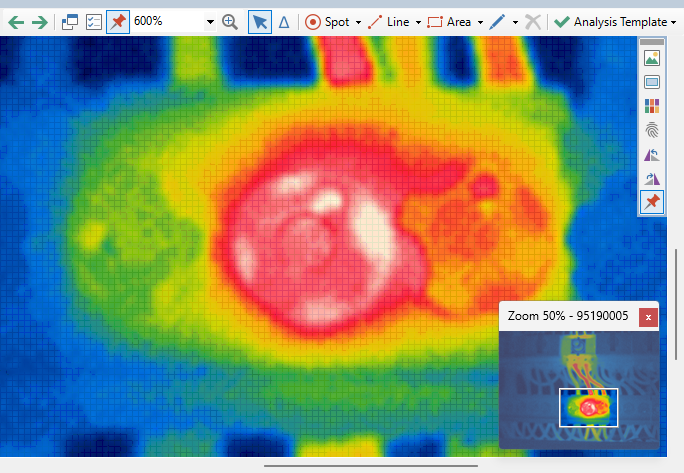
Closing the Zoom window returns the image to Auto zoom.
Note: Zooming changes only the displayed size. It does not change the infrared image data or measured temperatures. |