Use the connection tool  to calculate the difference between temperature values from two measurement objects.
Create a temperature difference
A connection calculates the first object's selected value minus the second object's selected value. You can connect spots, lines, or areas. Create both measurement objects before creating the connection.
To connect two measurement objects: 1.Select Connection Tool 2.Drag from the measurement object whose value will be the first value in the subtraction. 3.Release the mouse button over the measurement object whose value will be subtracted. |
The connection label displays the calculated difference. By default, a connection uses Value for a spot and Max for a line or area. The difference updates when either source value changes.
Select the values to subtract
A spot provides its Value. A line or area provides Min, Avg, and Max. Select independently which property to use from each connected object.
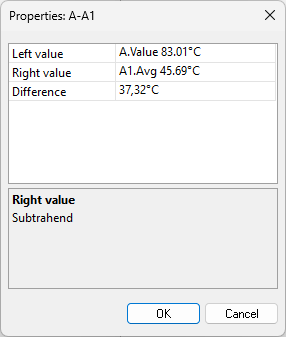
To change the values used by a connection: 1.Activate the selection tool 2.Double-click the connection line. 3.In Left value, select the property from the first object. 4.In Right value, select the property from the second object. 5.Click OK. |

You can also right-click the connection line or its label and select Parameters .... The Difference row shows the first selected value minus the second selected value.
For more information about selecting and editing measurement objects, see Selection tool.