Sort files and folders in the Folder Contents window to find items more easily. When you generate a report, images appear in the same order as in the folder.
Sort by name or date and time
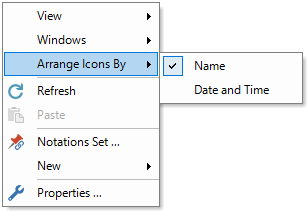
1.Right-click a blank area in the Folder Contents window.
2.Select Arrange Icons By > Name or Arrange Icons By > Date and Time.
3.To reverse the sort direction, select the same command again.
Sort in Details view
1.Click a column heading to sort by that column.
2.To reverse the sort direction, click the same heading again.